Showing posts with label Networking. Show all posts

Sunday, June 22, 2025

grIP v1.3.2

   grIP version 1.3.2 fixes a bug: the scan no longer stops if a "host is down" error is encountered.

The latest version can be downloaded from here, and the signature from here.

Tuesday, June 17, 2025

grIP v1.3.1

  grIP version 1.3.1 has even better shuffling of the scan space, with even lower memory usage and escapes "[" and "]" as it should to avoid ambiguity in received data.

The latest version can be downloaded from here, and the signature from here.

Thursday, June 16, 2022

grIP v1.2

 grIP version 1.2 has much improved shuffling of the scan space.

The latest version can be downloaded from here, and the signature from here.

Saturday, March 5, 2022

grIP v1.1

grIP version 1.1 adds the ability to send and receive data from any ports that are found open. It also fixes a small bug.

The latest version can be downloaded from here, and the signature from here.

Wednesday, January 19, 2022

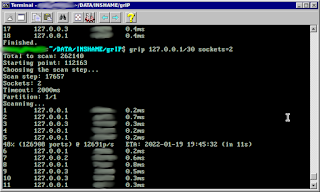
grIP v1.0

For my port and IP scanning needs I often used Angry IP Scanner. I've been using it in Windows XP since the early 00's and it's still good, even after its more recent Java rewrite.

While using it a few days ago it, some features of it and the lack of some others, gave me a nudge to write my own scanner. Go seemed like a good language for it, given it's amazing multithreading abilities and its easy to use standard library.


I called it grIP and it has a few somewhat unique, I think, features.
  • Shuffled, not random, scanning. I wanted it to shuffle the whole list of IP-port combinations and scan them in parallel. Angry IP Scanner has random scanning (but not shuffled) which in theory is not good for scanning humongous IP ranges (being a GUI app) and it will also repeat some IPs. So, for example, scanning 254 random IPs on the 192.168.0.0/24 range will not scan all of the IPs because some will be chosen more than once. The main problem with making a shuffled scan is that when scanning ranges like the whole IPv4-port range, which is 281470681743360 ports, shuffling it properly is impossible. Even having to keep a single bit for every of these ports to remember whether it's been scanned or not would occupy 32GiB of RAM. So I chose to do a half-assed shuffle: I chose a random starting point on that range, I chose a somewhat random step size which is co-prime with the size of the range, and then step through the range using that step size until I reach again my starting point. With the two numbers being co-primes this method is guaranteed to visit every port exactly once before looping back to the starting point. On top of it every 1 million ports generated with this method are also buffered and truly shuffled to further improve the shuffle. So, not a perfectly shuffled scan, but it's shuffled and it uses very little RAM.
  • One thread per port, not one thread per IP. Angry IP Scan uses one thread per IP, so if you are trying to scan 65354 ports in a 254 IP LAN, it will at best run 256 threads, and it's still quite slow. GrIP can use 3900 threads, at least on a Linux box. The 1 thread per IP that seems to be used by Angry IP Scanner doesn't seem to be an arbitrary limitation though, and it may even have it's uses. If you scan a single IP with many threads, it may fail to respond to some of your port checks and you may see less open ports than it really has. So keep that in mind when scanning with grIP.
  • IPv6 support. Limited to single IPs but it's there. I tried to add support for IPv6 ranges, but it needs some datatypes to be reworked so I may do that in a future version if I need it or if someone requests it.
  • Scan partitioning, for cooperative scans. You can split the ports to be scanned and do only part of the scan while other computers or other people do the other parts.
It's a console app that runs on Windows, Linux, Mac and the Raspberry Pi (well, any ARM Linux really). Similarly to Aperito, it uses a non standard style of command line arguments where the order matters and "-h" style arguments don't exist. 

Some example commands:
  • grip 192.168.0.1-192.168.0.254
    Scans all ports in your LAN (if that's your range).
  • grip 80,20-25 192.168.0.1-192.168.0.254
    Same range but only port 80 and ports 20 to 25.
  • grip 80,20-25 192.168.0.1/24
    Same but CIDR notation.
  • grip 22,80 192.168.0.15 2a00:1450:4014:80e::200e
    Port 22 and 80 on one IPv4 and one IPv6.
  • grip host=www.example.com
    All ports on www.example.com.
  • grip 80-85 192.168.0.17 90-95 192.168.0.21-192.168.0.31
    Ports 80 to 85 on one IP and ports 90 to 95 on a range of IPs.
  • grip sockets=2 192.168.0.1/24 timeout=100
    All ports in your LAN but using only 2 instead of the default 100 sockets in parallel and with a 100ms timeout instead of the default 2000ms. The sockets and timeout parameters can go anywhere in the arguments.
  • grip 0.0.0.0/0 1/3 sockets=3900
    grip 0.0.0.0/0 2/3 sockets=3900
    grip 0.0.0.0/0 3/3 sockets=3900
    Three commands, to be run on three separate computers, that cooperatively scan the whole IPv4 internet for any open ports using 3900 sockets each in parallel. It will still never finish but it's 3 times faster than doing it alone. :-)
  • grip 150.150.100.0/24 rdns
    Scans a range and also shows the reverse DNS of any finds. Again, the "rdns" can go anywhere in the arguments.
  • grip 192.168.0./24 file=mylan.txt
    Scans your LAN and appends the open ports found to mylan.txt.
There are also a couple of verbosity related commands and you can find more info by simply running the program in a console so that it prints a help page.

  The latest version can be downloaded from here, and the signature from here.

Update: v1.0.1 Fixes a bug in Windows and some tiny details in the help page.

Wednesday, April 13, 2011

Quick note: Why I use Firefox

Although Chrome is a very pretty and fast browser I still preffer Firefox for the following reasons: (obviously I will not try to explain why I don't use IE)
  1. Loading custom spell-checking dictionaries to Firefox allows me to spell-check both Greek and English at the same time, without even switching dictionaries (someone has already made a combined dictionary for that).
  2. There is a master password to protect the passwords in the password manager of Firefox. The Chrome guys for some reason refuse to implement that giving some ridiculous explanation on why they don't want to do it. (I can explain why it's ridiculous if someone disagrees)
    BTW that makes Firefox Portable a great choice in portable browsers.
  3. Firefox can change proxies easily while Chrome depends mostly on the system wide proxy settings (like IE) or some, not so practical, tricks.
  4. TorButton is only for Firefox.
  5. When I am making a webpage, the first browser on which it works as expected is Firefox. I've had some minor problems with Chrome when, for example, I was trying to implement a CSS sticky footer. Chrome would make the page a little bigger than the window thus showing a vertical scrollbar although there was no reason. Maybe it was some mistake I did but I had no problems in Firefox.
    For some reason Firefox, usually, is the one that shows things as I expected them to be rendered, despite Chrome being more standards compliant.
  6. Nothing compares to FireBug when you develop stuff... NOTHING.
  7. Although I still haven't done some serious tests, by my personal experience I find Firefox more responsive, compared to Chrome, when many tabs are open. But, usually, people don't work with 25+ tabs open at the same time like I do, so Chrome will be more responsive for normal usage.
Why not Opera? They stick to the standards more than anyone. These guys are good programmers, I can't deny that. But I really like having open source software when I'm using it to communicate with banks etc. Also some of the points above apply to Opera too.

Hey this note wasn't that quick after all...

Wednesday, August 22, 2007

Old Program - Simple

Simple is a portscanner. It used to be very simple at the beginning but it soon got a bit complex. Initially it was a program which scanned a class C network for computers with windows shares. Before some years there were lots of computers with unprotected shares. Now you will hardly find some. But Simple still works. The big hit for it was the Service Pack 2 for Windows XP. For some stupid reason (to stop your computer from doing DoS attacks or something) Microsoft decided to put a hardcoded (= not something that can be changed like a normal parameter) limit of 10 on the concurrently half-open connections. Fortunately some guys made a great toll to modify this limit (some antiviruses detect this tool as a virus but you can safely ignore them).

You can download Simple by clicking here.

Here is a screenshot:


Old Program - Anonymous NET SEND

Windows messaging is a service that runs on the background of Windows (this is the default for Windows up to XP SP2. After that you have to manually turn this feature on). It's purpose is to send and receive messages to and from other users on the same local network (on older versions of Windows it used to accept messages from the Internet too, which was a welcoming gesture for spammers.). When you receive a message a window pops up containing the name of the computer that sent the message, the time on which it was sent and the message itself. Messages can be send by issuing the NET SEND user message command on the command line. But this of course will reveal the name of your computer to the recipient.

Anonymous NET SEND allows you to spoof your computers name while sending a message to another user.

You can download Anonymous NET SEND by clicking here.
The source code can be found here. (link broken, ask me if you want it)  (VB6 source released under GNU/GPL v3 or later)

Here is a screenshot:


Popular Posts